
POKE ALLIANCE / HELPER
Poke Alliance Helper
Exclusive ProductStatusUpdate in progress
Last update
Poke Alliance Helper is being updated and will be available again soon.
Poke Alliance bot and helper for Pokémon management, shiny targeting, Fishing, Cavebot routes, alarms and hotkeys.
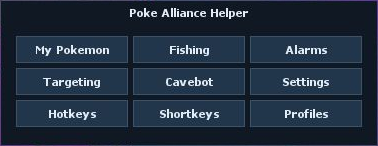
Update in progress
Poke Alliance Helper is being updated and will be available again soon.
PRODUCT PREVIEW
Gallery
Screenshots and video previews of the helper.
INSIDE THE HELPER
Features
Expand a feature to explore its controls and screenshots.
Missing a feature? Suggest an improvement
Tell us what you would like this helper to do.
My PokemonClick to expandClick to collapse
Manage your summoned Pokémon’s combat, movement, revive and care from one panel.
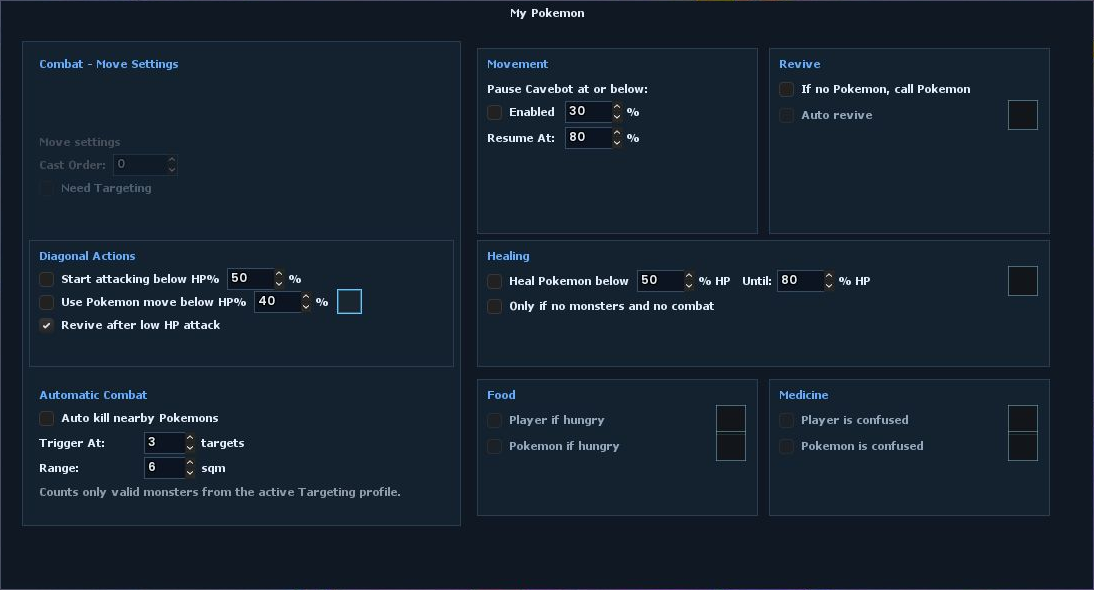
Combat & move settings
Set your summon’s move cast order and whether a move needs a target. Configure low-HP attack and Pokémon-move thresholds.
Diagonal actions
Choose when to start attacking based on HP, use a selected Pokémon move below an HP threshold, and revive after a low-HP attack.
Automatic combat
Automatically attack nearby wild Pokémon after the configured number are within range; set both the target count and distance.
Movement
Pause Cavebot when your summon drops below a chosen HP level, then resume after it recovers to the configured threshold.
Revive
Call a Pokémon when none is summoned, enable automatic revive, and choose the revive item.
Healing
Use a selected item to heal your Pokémon below a chosen HP percentage until it reaches the target percentage. You can restrict healing to when there are no nearby monsters and no combat.
Food
Choose food items for your character or Pokémon and use them when either is hungry.
Medicine
Choose medicine items to use when your character or Pokémon has negative status (e.g. confused).
FishingClick to expandClick to collapse
Set up automatic fishing at saved map coordinates, choose bait, and configure conditions that pause it for safety.
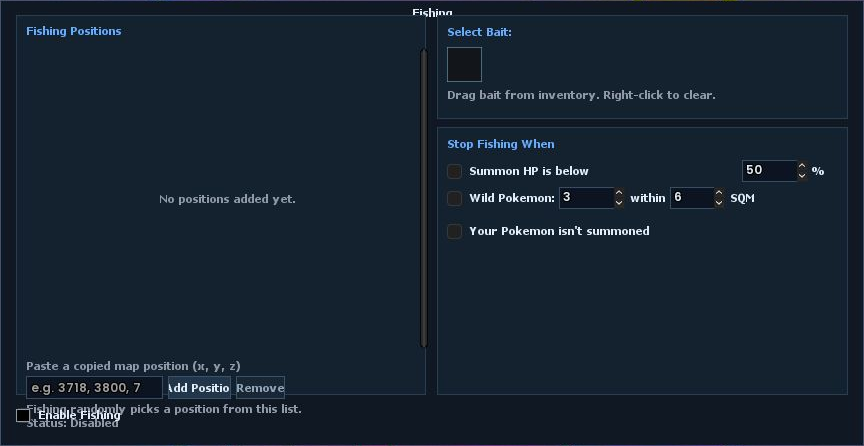
Fishing spots
Paste, add and remove map coordinates. Fishing randomly chooses a saved position for each cast and avoids repeating the previous spot when another is available.
Bait
Drag a bait item from your inventory into the slot; right-click to clear it. When fishing is enabled, the helper uses the selected bait and waits for confirmation that it is attached to the rod before casting.
Automatic casting
Use the Fishing-slot rod at the chosen spot, watch for bubbles on that tile, and reel in automatically when a bite is detected.
Safety & status
Optionally pause when summon HP falls below a threshold, too many wild Pokémon are within range, or no own Pokémon is summoned. Fishing resumes when the condition clears, and the panel shows its current status.
Script control
Use setfishingon(), setfishingoff(), setfishingtoggle(), or setfishing on/off/toggle.
AlarmsClick to expandClick to collapse
Monitor nearby players, GM activity, Pokémon encounters, low character HP and incoming messages. Choose audible alerts and optional safe logout for supported events.
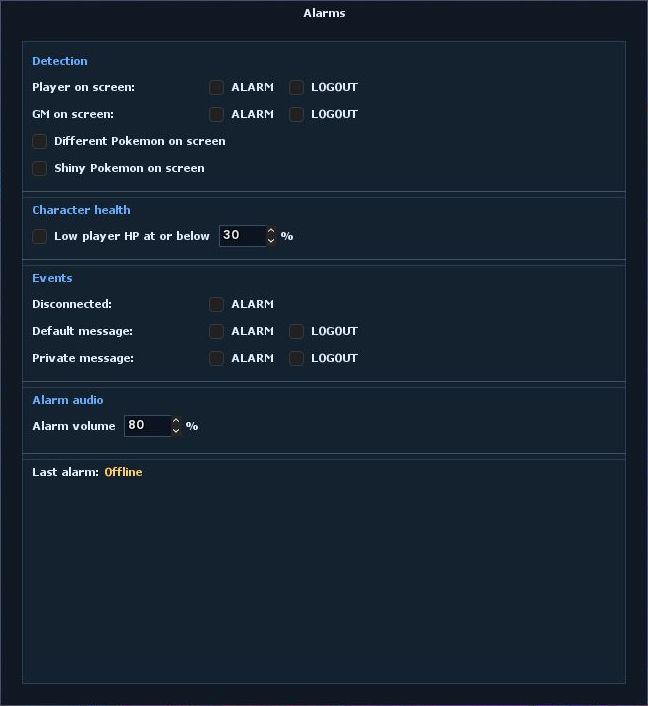
Player & GM detection
Choose ALARM, LOGOUT or both independently for other players on screen and detected GMs. The GM controls also cover incoming GM messages.
Pokémon encounters
Enable an alert for a valid wild Pokémon missing from your Targeting list, or for a living shiny Pokémon on screen.
Character health
Raise an alarm when your character’s HP is at or below the percentage you set. This threshold monitors the player, not the summoned Pokémon.
Disconnected
Enable an audible alert when an online game session ends. It follows the last online Cavebot or Fishing state and skips the scheduled quiet period from 12:40 to 12:45 local time.
Default & private messages
Default message covers incoming local Say, Whisper and Yell messages; Private message covers incoming PMs. Each has independent ALARM and LOGOUT switches. Your own messages and outgoing PMs do not trigger these rules.
Safe logout
LOGOUT pauses route movement, lets valid targets finish and waits for combat to clear before requesting a safe logout. It is not an instant force-close of the game.
Alarm audio
Set alarm volume from 0 to 100%. Helper alarm audio is independent of muted game audio.
Monitoring & status
In-game alarm and logout actions require Cavebot or Fishing to be enabled and the character to be outside a Protection Zone.
TargetingClick to expandClick to collapse
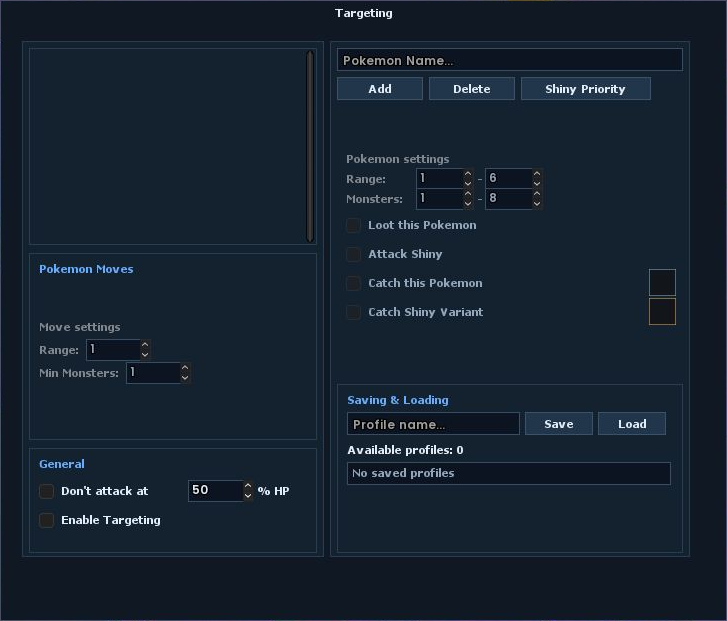
Build Pokémon-specific target rules, control your summon’s moves, and choose how defeated and shiny targets are handled.
Target list
Add supported Pokémon by name, remove entries, and select a Pokémon to edit its individual rule.
Range & nearby count
Set the minimum and maximum distance, plus how many of that Pokémon must be nearby before the rule is eligible.
Move selection
Toggle individual summon moves on or off. Right-click a move to open its settings.
Move conditions
For each move, set its usable range and the minimum number of nearby monsters required.
Attack Shiny
Choose whether this Pokémon rule also allows targeting its shiny variant.
Loot & catch
Enable corpse looting, or drag a capture item into the regular or shiny slot and choose which targets to catch. Right-click a slot to clear it.
General & profiles
Enable Targeting, optionally avoid starting new attacks below a chosen summon-HP percentage, and save or load named targeting setups.
Shiny Priority
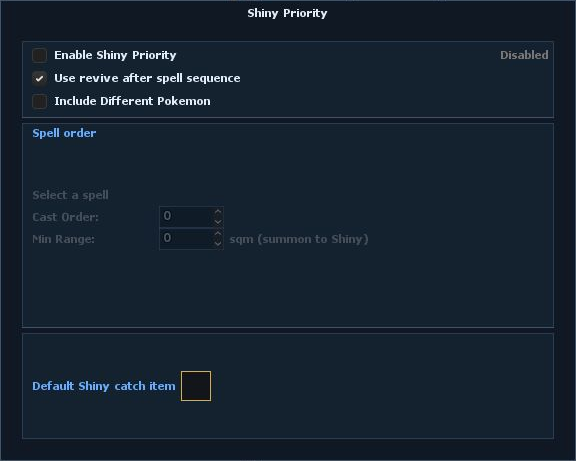
Open Shiny Priority from Targeting to configure a dedicated spell sequence, optional revival and a fallback catch item for priority encounters.
Enable Shiny Priority
Turn priority monitoring on or off. When an eligible target is detected within range, the helper focuses on it and runs the dedicated combat, loot and catch workflow.
Status
Disabled means the feature is off; Watching means it is enabled and waiting. During an encounter, the status shows the target and the current phase or waiting condition.
Use revive after spell sequence
Run a revive-and-recall cycle after the configured spell sequence, then return to the spell sequence. Turn it off to continue combat without this between-sequence revival.
Include Different Pokemon
Also treat valid wild Pokémon missing from your Targeting list as priority targets. When this is off, priority selection is limited to shiny Pokémon.
Spell order
Available non-passive Pokémon moves appear here. Left-click a move to edit its settings; right-click to reset its Cast Order and Min Range to 0. The number on its icon shows its configured order. The move controls stay disabled when no usable move is available.
Cast Order
Choose a value from 1 to 10 to include the selected spell in the priority sequence; lower values run first. A value of 0 excludes it. Moves with the same order are resolved by their move-slot number.
Min Range
Set the minimum distance from your summon to the priority target, in sqm, required before the selected spell can cast. The sequence waits if the summon is too close. A value of 0 adds no minimum-distance restriction.
Default Shiny catch item
Drag a capture item from your inventory into this slot; right-click to clear it. The priority catch workflow uses the target’s configured shiny catch item when available, otherwise this fallback item.
CavebotClick to expandClick to collapse
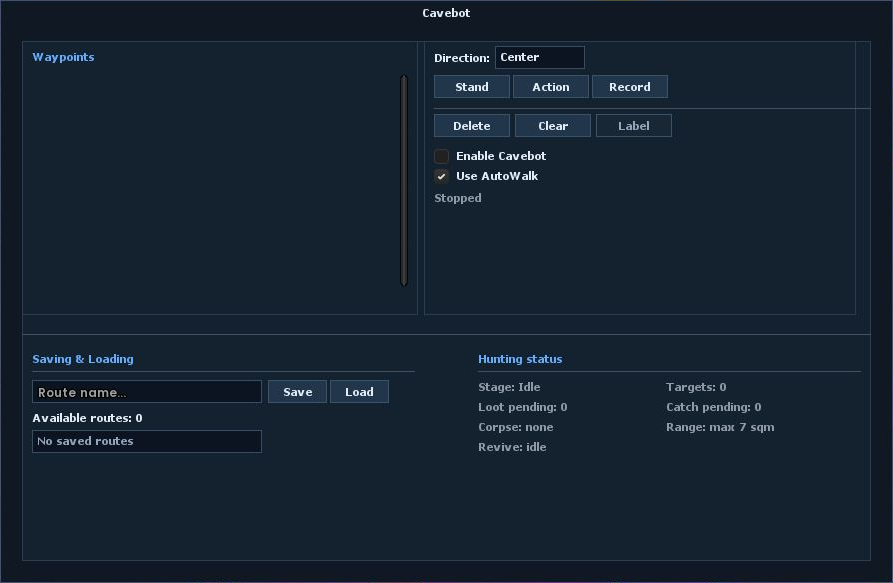
Build, save and run waypoint routes for automatic movement. Add one-shot Actions to coordinate hunts, then monitor loot, catches and Pokémon recovery.
Waypoints & routes
Create Stand and Action waypoints, record movement, set a direction, label or clear entries, and save named routes to reuse later.
Action scripts
Run a one-shot script at a waypoint. Actions support all variables listed in Script Reference, including player and summon state; combine them with conditions and supported commands. Hunt and Kill + Loot buttons can insert ready-made action templates.
Hunt status
Track the current stage, nearby targets, pending loot and catches, corpse, range and revive state while Cavebot runs.
SettingsClick to expandClick to collapse
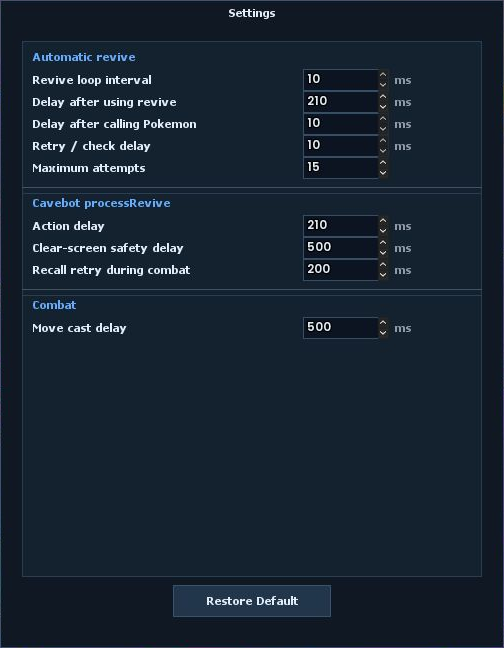
Tune revive and combat timings to your internet connection’s latency (ping) and the server’s response time. Correct timings improve revive efficiency - how quickly your Pokémon is revived and summoned again. Smaller delays are not always better: values that are too low can cause missed actions or extra retries.
Automatic revive
Set how often the revive loop checks your Pokémon, how long it waits after using a revive item and calling your Pokémon, and the delay between retries or checks. Maximum attempts limits how many attempts the sequence makes.
Cavebot processRevive
Adjust the revive action delay and the clear-screen safety delay used by Cavebot’s recovery sequence. These waits give the client and server time to confirm actions and that combat has cleared.
Combat
Move cast delay controls the wait between Pokémon move casts.
Connection & timing
Delays are measured in milliseconds (ms); Maximum attempts is a count. Start with the defaults and adjust gradually for your ping and server response, not just your download speed. Aim for the shortest reliable revive sequence, not simply the lowest numbers.
Restore Default
Reset the timing and attempt values in this window to their defaults without deleting profiles or routes.
Recall retry during combat
Set how long the Cavebot recovery sequence waits between recall attempts while combat is still active.
HotkeysClick to expandClick to collapse
Configure keyboard shortcuts and recurring scripts in one place. Choose a key, add the script it should run, and control which automations are active.
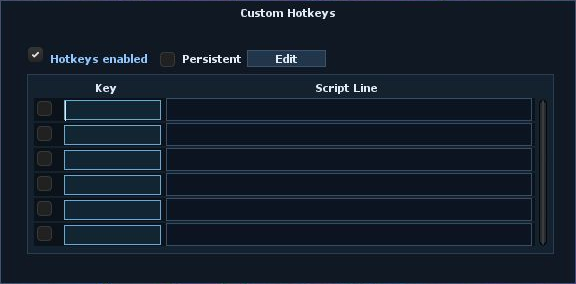
Key bindings
Set a key or key combination for a script, edit its command, and enable or disable individual entries. Press the same key again to stop a running script.
Hotkeys enabled
The main switch pauses the whole Hotkeys system and stops running scripts without deleting your saved entries.
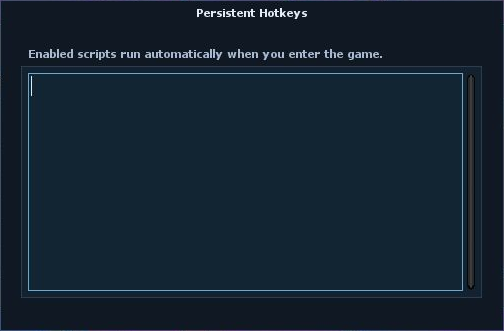
Persistent scripts
Enable Persistent and use its separate editor for scripts attached to your character. They start automatically when you enter the game - no key press is needed - and repeat at their configured interval while you are online and the helper is not paused.
Control & recovery
Turn Persistent off to stop those scripts. A persistent script that finishes, is stopped, or encounters an error will not restart on its own.
ShortkeysClick to expandClick to collapse
Create named text commands and connect each one to a reusable script line.
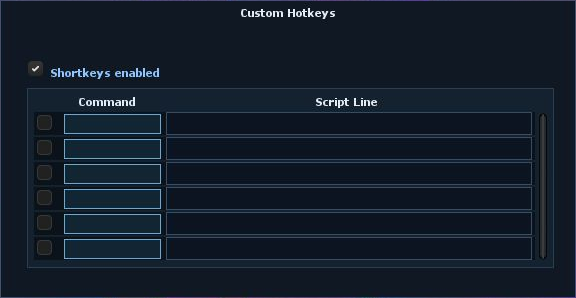
Command triggers
Each row pairs a command with a script. Typing the exact command in local chat runs its script instead of sending the command. Other messages and private channels are unchanged.
Individual controls
Enable or disable entries one by one, or switch off the entire Shortkeys system with the main toggle.
Saved settings
Your commands and scripts are saved in the helper settings for reuse.
ProfilesClick to expandClick to collapse
Save named helper profiles to quickly switch configurations. Each profile stores your settings, Cavebot waypoints, Targeting rules, Hotkeys, Shortkeys and Persistent scripts.
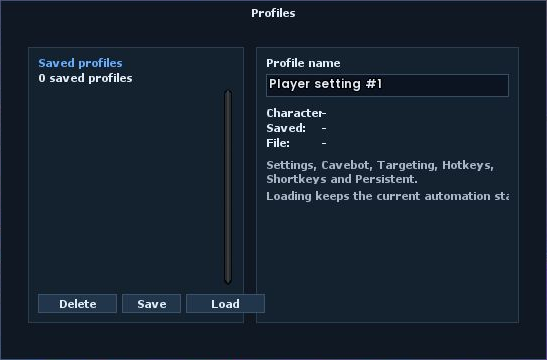
Save & load
Create a named setup, update it with Save, and choose Load to apply it without adding a global pause. Cavebot, Targeting and Fishing keep their current enabled state; unchanged running scripts continue without restarting. A missing or invalid profile leaves your current setup unchanged.
Per-character default
Right-click a saved profile and set it as the default for the current character. It loads automatically when you enter the game without forcing a global pause or switching on disabled automation.
Recoverable delete
Delete removes a profile from the active list but keeps a recoverable copy in Settings/Profiles.