
MIRACLE 7.4 / HELPER
Miracle Helper
StatusActive
Last update
Miracle 7.4 bot and helper with targeting, Cavebot, healing and ElfBot-style scripts. Configure twelve panels and save complete profiles.
Download DakosApp Launcher from My Account to install and use your helper.
Show / hide the helperShift + F11Press in the game window.
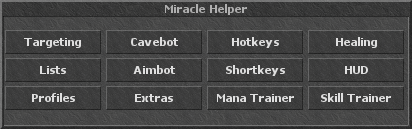
INSIDE THE HELPER
Features
Expand a feature to explore its controls and screenshots.
Missing a feature? Suggest an improvement
Tell us what you would like this helper to do.
TargetingClick to expandClick to collapse
Create monster rules and choose how your character selects, approaches and attacks each target.
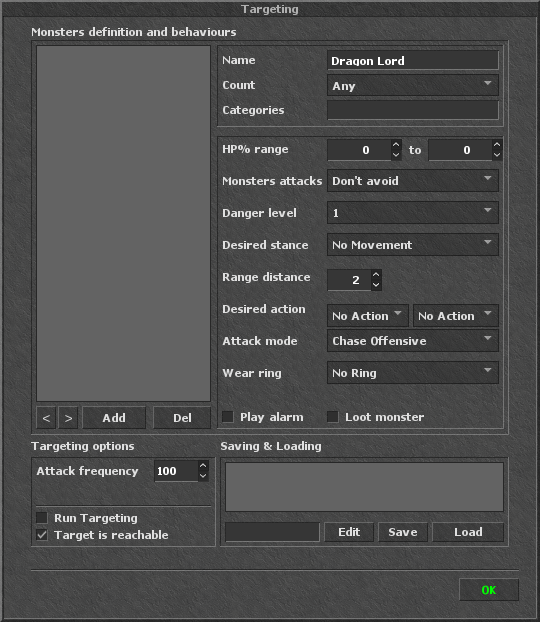
Monster rules
Add a monster by name, select it to edit its rule, and use the arrows to change rule order. A wildcard (*) can cover monsters without a more specific rule. Delete removes the selected entry.
Count, categories & HP range
Choose the required nearby monster count, assign categories, and restrict a rule to a target HP range. Categories let you share behavior between groups of monsters.
Movement & distance
Choose Desired stance and Range distance to control positioning. Monsters attacks sets the configured avoidance behavior; Danger level supplies the rule’s danger rating.
Combat actions
Choose the two Desired action controls, set Attack mode, and select a ring under Wear ring. Each monster can have its own combat setup.
Alarms & loot
Enable Play alarm for a matching monster, or Loot monster to let Cavebot’s looting system handle its corpse using your loot list.
Run & reachability
Run Targeting starts or pauses target selection. Attack frequency sets the update interval in milliseconds. Target is reachable restricts selection to targets the client considers reachable.
Save & load
Name and save a targeting setup, select a saved entry to Load it, or use Edit to work with its settings. Complete helper Profiles can also include Targeting.
CavebotClick to expandClick to collapse
Build reusable waypoint routes, add actions and tool steps, and combine movement with looting and alerts.
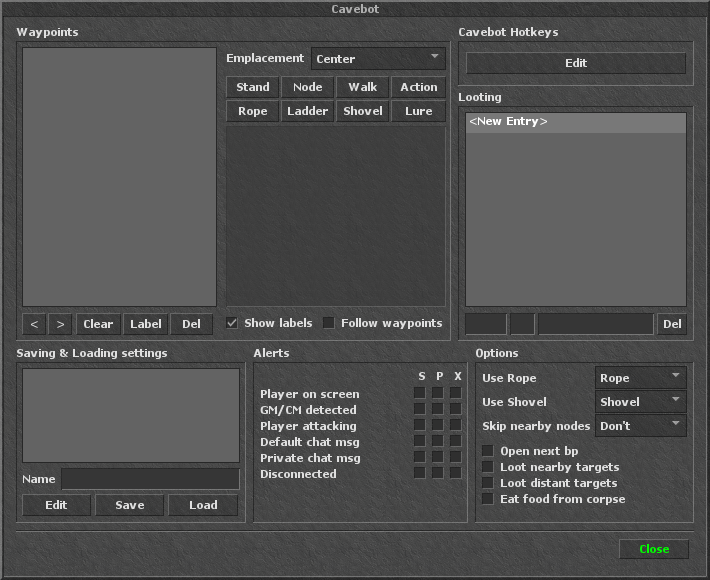
Waypoint types
Add Stand, Node, Walk or Action steps, plus Rope, Ladder, Shovel and Lure waypoints. Emplacement chooses where a new waypoint is placed relative to your character.
Route editing
Select and reorder waypoints with the arrows, add a Label, delete an entry or Clear the route. Show labels controls map labels; Follow waypoints starts or pauses the route.
Action scripts & Cavebot Hotkeys
Action waypoints run an ElfBot-style script at that point in the route. The Cavebot Hotkeys editor configures scripts associated with the running route.
Loot list
Add items to the Looting list and configure their loot entry. Delete removes the selected item. Monster-specific Loot monster rules in Targeting decide which targets are eligible for looting.
Alerts: S, P & X
Configure events independently: another player on screen, detected GM/CM, a player attacking you, local messages, private messages or disconnection. S plays a sound, P pauses Cavebot, and X exits the game client.
Tools & nearby nodes
Select the rope and shovel to use for tool waypoints. Skip nearby nodes chooses whether nearby Node waypoints may be skipped.
Looting options
Open next bp opens the next backpack when needed. Choose nearby or distant targets to loot and whether to eat food from corpses.
Saved routes
Enter a Name and Save the route and its settings. Select a saved entry to Load it, or use Edit to work with the configuration.
HotkeysClick to expandClick to collapse
Bind keys to ElfBot-style scripts and use the separate Persistent editor for scripts that run automatically.
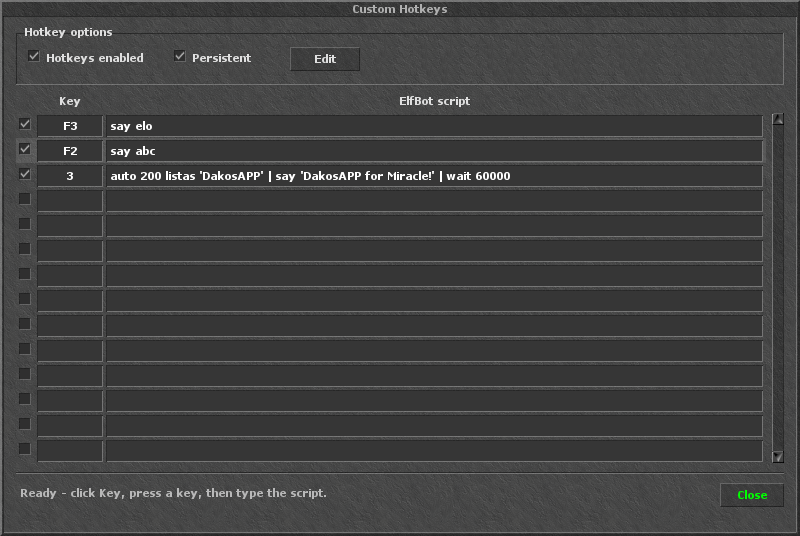
Key bindings
Click a Key field and press the key or key combination, then type its ElfBot script. Use the checkbox to enable that row. Press Delete in the key field to clear the binding.
Hotkeys enabled
The main switch enables or pauses the Hotkeys system. Pressing a bound key starts its script; pressing it again stops that script if it is still running.
Persistent editor
Enable Persistent and click Edit to open its separate editor. Put one script on each line. Lines starting with auto repeat at the interval specified in the script while the character is online and the helper is active.
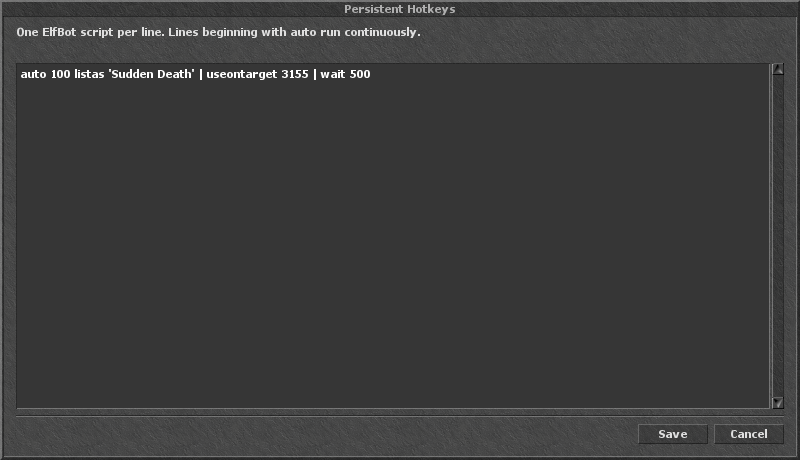
Script examples
say elo sends a message once. auto 100 listas 'Sudden Death' | useontarget 3155 | wait 500 repeatedly uses the selected rune on your target, with the configured wait between actions.
Save & cancel
Save applies the Persistent editor’s contents; Cancel closes it without applying those edits. Hotkey rows and Persistent scripts are also included in complete Profiles.
HealingClick to expandClick to collapse
Configure automatic spells and items for your character, plus separate healing rules for friends.
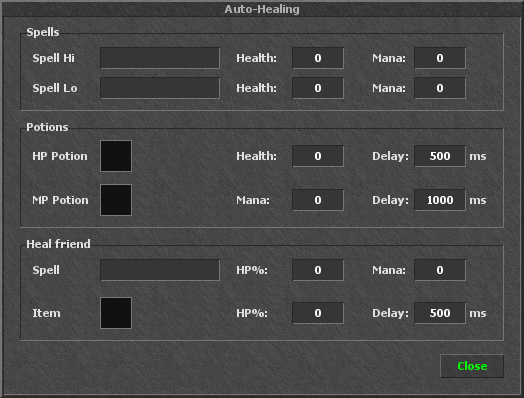
Spell Hi & Spell Lo
Enter the spell words and set the Health and Mana thresholds for each rule. Spell Hi is the higher-priority spell; Spell Lo provides another rule with its own conditions.
HP & MP items
Drag the item you want to use into the HP Potion or MP Potion slot. Set the health or mana threshold and a separate Delay in milliseconds for each item. Right-click an item slot to clear it.
Heal friend
Choose a spell or an item for players on your friend lists. Set the friend HP% threshold, the mana needed for a spell, and the item delay independently.
Reusable settings
Healing settings are saved with the helper and can be included in a complete Profile. Closing the window keeps the configured rules available.
ListsClick to expandClick to collapse
Organize players into enemy and friend groups used by the helper’s combat and support features.
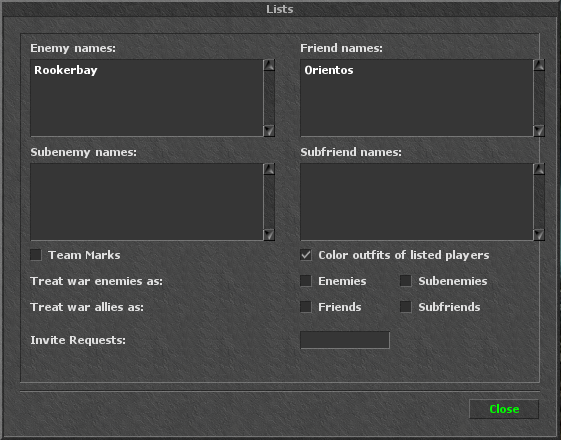
Four player groups
Enter player names on separate lines under Enemy names, Subenemy names, Friend names or Subfriend names. The helper uses these relations in supported targeting, aiming and friend-healing rules.
Team marks & outfit colors
Team Marks highlights listed players. Color outfits of listed players gives friend and enemy groups distinct colors in your client view.
War relations
Treat war enemies as assigns war enemies to Enemies or Subenemies. Treat war allies as assigns allies to Friends or Subfriends.
Invite Requests
Enter the names accepted by the helper’s party invitation rules. List settings can also be saved in a complete Profile.
AimbotClick to expandClick to collapse
Choose player targets and coordinate attacks, runes and spell combos using your player lists.
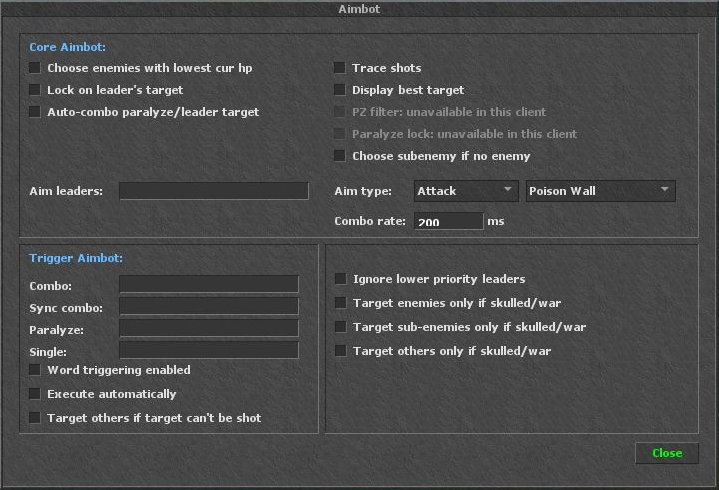
Target priority
Choose lowest HP, prefer Subenemies or follow a leader’s target. Optional fallback settings control whether other players may be considered. The panel marks unavailable client options in grey.
Attack & combo settings
Select the aiming action and rune, set the combo rate, and configure combo, synchronization, paralyze and single-cast words. Automatic execution and word triggers have separate controls.
Team filters
Use Enemy and Subenemy lists and the available skull or war filters to restrict eligible player targets.
ShortkeysClick to expandClick to collapse
Create named text commands that run reusable ElfBot-style scripts.
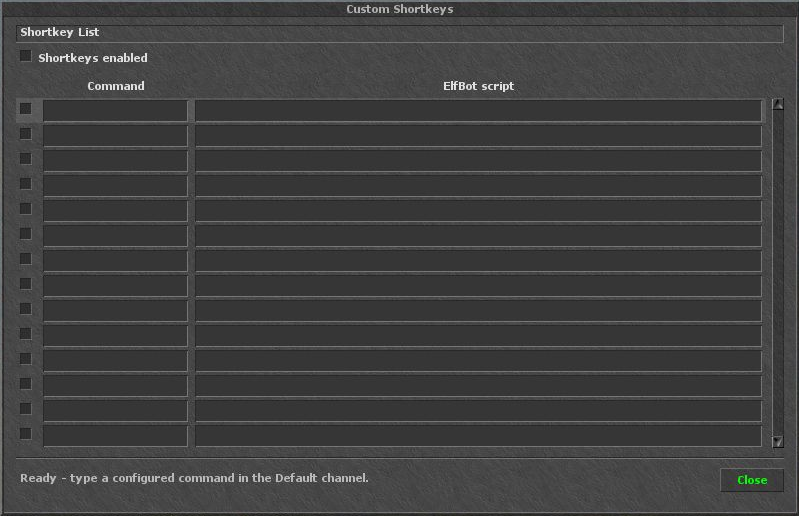
Command triggers
Pair a command with a script line. Typing the exact enabled command in local chat executes the script instead of sending the command as a message.
Individual controls
Enable or disable entries separately, use the main Shortkeys switch, and save your command collection in a complete Profile.
HUDClick to expandClick to collapse
Choose which helper information appears on screen while you play.
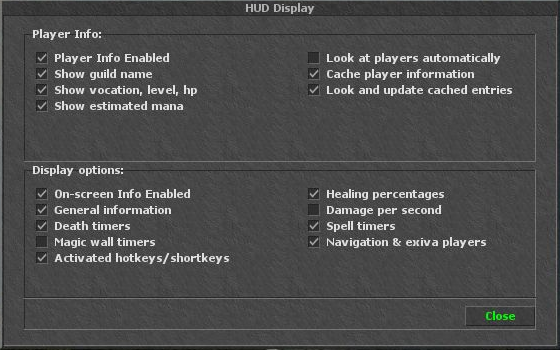
Player information
Configure supported player details such as guild, vocation, level and HP. Optional information caching stores details already observed by your client.
On-screen information
Choose general information, active hotkeys, healing percentages and damage per second, together with death, magic-wall and spell timers. Navigation and exiva player information have their own switch.
ProfilesClick to expandClick to collapse
Save one named configuration for the helper and choose which of its eleven modules to include.
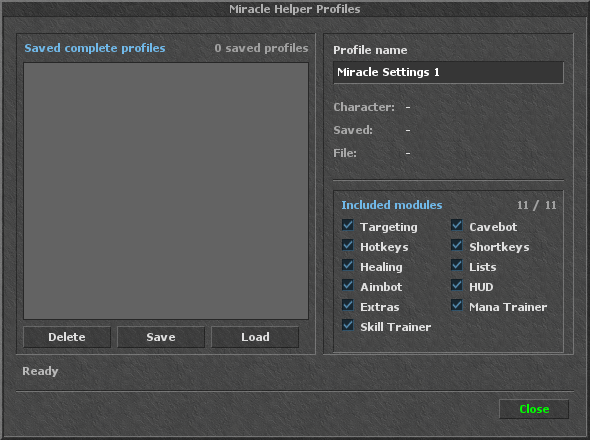
Complete setups
Profiles can include Targeting, Cavebot, Hotkeys, Shortkeys, Healing, Lists, Aimbot, HUD, Extras, Mana Trainer and Skill Trainer. Use Included modules to choose the parts you want to save.
Save, load & delete
Enter a Profile name and click Save. Select a saved profile to Load its included settings, or use Delete to remove that saved profile.
Profile details
The panel shows the saved character, save time and file, plus how many modules are included. Use separate profiles for different characters or hunting setups.
ExtrasClick to expandClick to collapse
Configure the additional tools supported by the Miracle client.
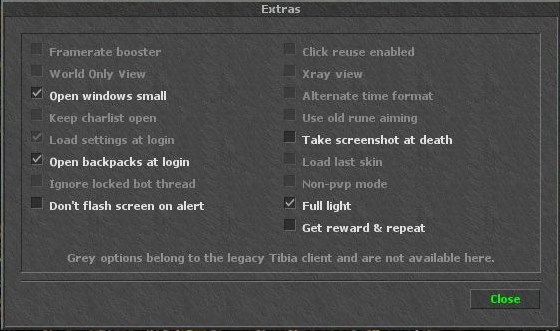
Client convenience
Use the supported options for full light, smaller helper windows, opening backpacks at login, screen alerts and screenshots at death.
Task rewards
Repeat Task Reward can request a reward and repeat when the supported task is complete.
Mana TrainerClick to expandClick to collapse
Train magic with a selected spell and optional mana items, using configurable thresholds and delays.
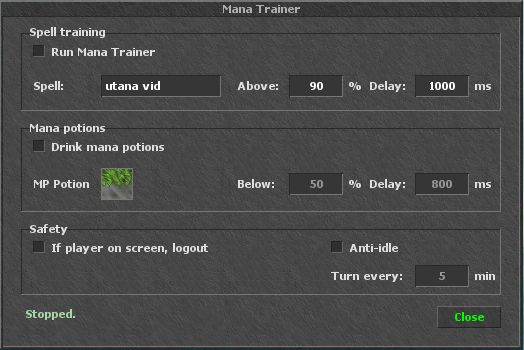
Spell training
Enter a spell, choose the mana percentage above which it may cast, and set the casting delay.
Mana items
Enable mana items, drag the selected item into its slot, and configure when to drink and how long to wait between uses.
Controls & safety
Enable or pause training and use the player-detection logout setting. Anti-idle turns the character at the configured interval in minutes. The status shows the current training state and mana percentage.
Skill TrainerClick to expandClick to collapse
Train against a chosen target and configure automatic spear collection around it.
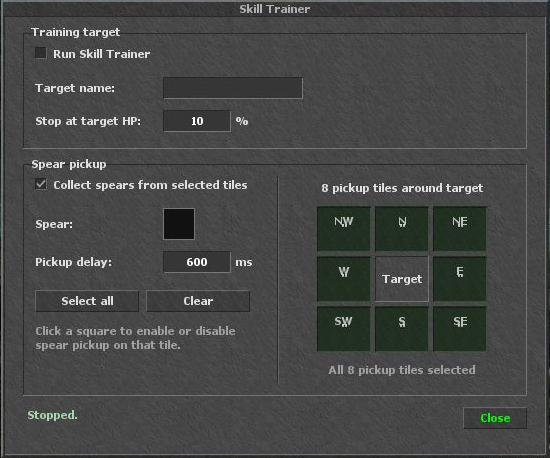
Training target
Choose the target name and a health percentage at which training stops attacking that target.
Spear collection
Enable collection, select the spear item, choose the tiles around the target to search, and set the pickup delay.
Saved setup
Keep the training configuration in the helper settings or include it in a complete Profile.
LICENCE & UPDATES
Get Miracle Helper
Purchase access for your existing account or create one during checkout.