
MEDIVIA / HELPER
Medivia Helper
StatusActive
Last update
Medivia bot and helper with targeting, Cavebot, healing and hotkeys. Configure twelve feature panels and save complete profiles.
Download DakosApp Launcher from My Account to install and use your helper.
Show / hide the helperShift + F11Press in the game window.
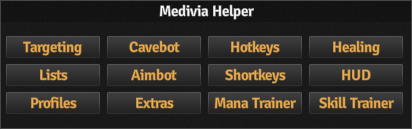
PRODUCT PREVIEW
Gallery
Screenshots and video previews of the helper.
INSIDE THE HELPER
Features
Expand a feature to explore its controls and screenshots.
Missing a feature? Suggest an improvement
Tell us what you would like this helper to do.
TargetingClick to expandClick to collapse
Create monster rules and choose targets using health, distance, danger and rule priorities. Configure attack mode, positioning, actions and loot settings.
CavebotClick to expandClick to collapse
Build and save waypoint routes with Stand, Node, Walk, Action, Rope, Ladder, Shovel and Lure entries. Configure looting, route options and alerts.
HotkeysClick to expandClick to collapse
Assign supported ElfBot-style scripts to keys and keep continuous scripts in a separate persistent editor. Enable or disable individual entries.
HealingClick to expandClick to collapse
Set health and mana thresholds for healing spells and potions. Configure item delays and separate healing rules for a friend.
ListsClick to expandClick to collapse
Maintain enemy, friend, subenemy and subfriend lists. Configure team marks, outfit colours and how war allies and enemies are classified.
AimbotClick to expandClick to collapse
Configure automatic target selection and attacks using player relationships, health and distance. Choose the spell or item for the selected action.
ShortkeysClick to expandClick to collapse
Set keyboard shortcuts for helper controls and quick actions. Save the configuration with your helper profile.
HUDClick to expandClick to collapse
Configure the information displayed over the game and adjust the helper display to your preferences.
ProfilesClick to expandClick to collapse
Save, load and delete complete named configurations. Choose which of the eleven feature groups are included in each profile.
ExtrasClick to expandClick to collapse
Configure additional helper utilities and save their settings with the rest of your setup.
Mana TrainerClick to expandClick to collapse
Configure mana training with selected spells or items and the conditions under which it runs.
Skill TrainerClick to expandClick to collapse
Configure skill training and its conditions, then save the setup for reuse.
LICENCE & UPDATES
Get Medivia Helper
Purchase access for your existing account or create one during checkout.